Adobe has spent years pushing people toward subscriptions, and every push sends some of them looking for an exit. For many, that exit is a browser tab. Photopea opens a PSD, shows the layers where the designer left them, and lets you start editing before you have typed a password or reached for a card.
That is a remarkable thing for a free tool to do. It is not the whole story, though. Icon Polls gives Photopea 3.5 out of 5 for 2026. It is generous and capable, sometimes frustrating, and it depends heavily on the machine you run it on.
The Numbers Behind the 3.5
This is how the editor scores in the areas that matter most for everyday use.
| Area | Stars | Score |
|---|---|---|
| Editing tools | ★★★★☆ | 4.2/5 |
| PSD and file compatibility | ★★★★☆ | 4.3/5 |
| Value of the free plan | ★★★★☆ | 4.4/5 |
| AI features | ★★★☆☆ | 3.4/5 |
| Ease of use | ★★★☆☆ | 3.1/5 |
| Mobile experience | ★★★☆☆ | 2.8/5 |
| Performance and stability | ★★★☆☆ | 3.3/5 |
| Overall | ★★★★☆ | 3.5/5 |
Photoshop's Layout, a Browser's Engine
Photopea is an online editor built for both raster and vector work. At the simple end, it crops, resizes, removes backgrounds and adds text. If you push it further, you get layers, masks, blending modes, selections, smart objects, RAW files, animation and web graphics.
PSD support is the headline. Photopea opens and saves layered PSD documents, and PSD works as its main project format. It also reads JPG, PNG, SVG, PDF, AI, XD, Sketch, XCF and several RAW formats. That makes it a handy translator when a client sends a file you cannot otherwise open.
One design choice deserves more attention than it usually gets. During ordinary editing, Photopea processes files on your own device instead of uploading them to its servers. That is good for privacy. The flip side is that nothing gets saved quietly in the background. If you close the tab on an unsaved project, the work is gone.
Installing Something That Isn't Really an App
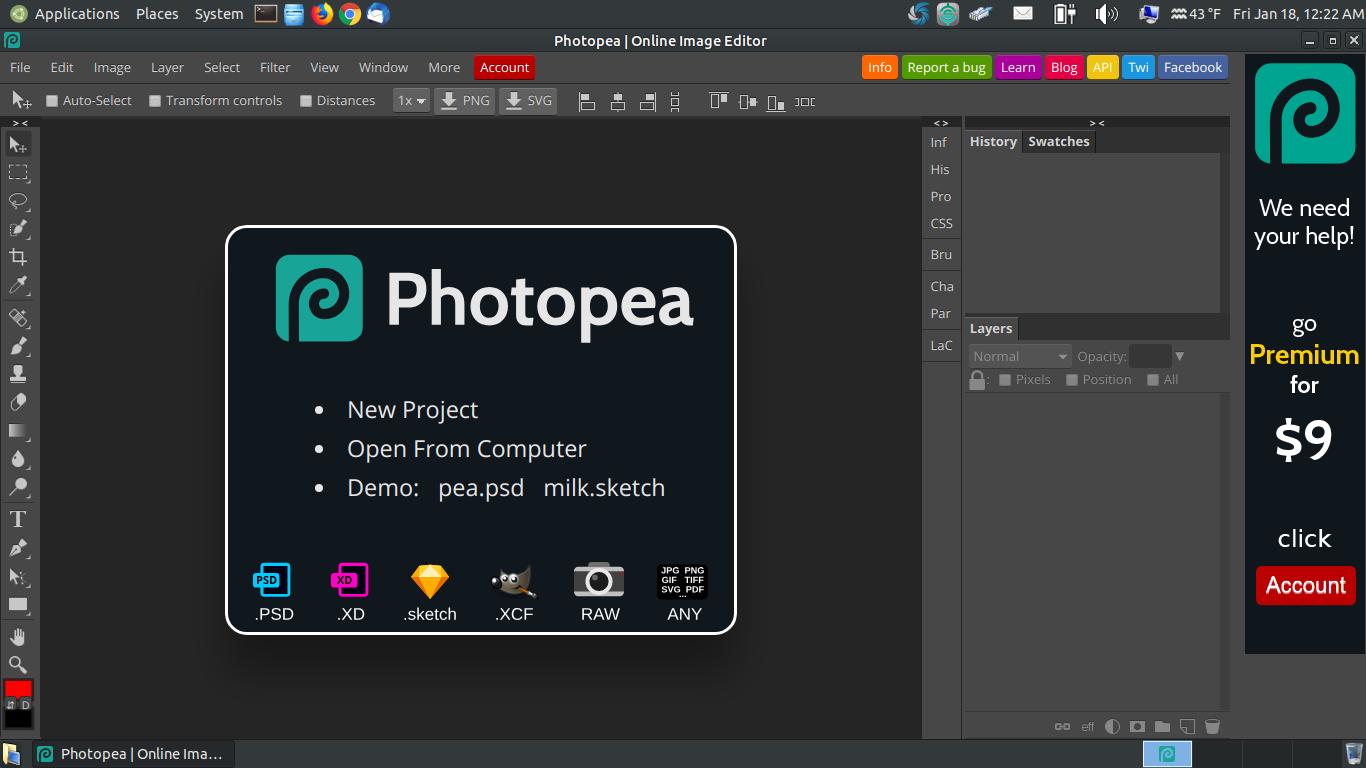
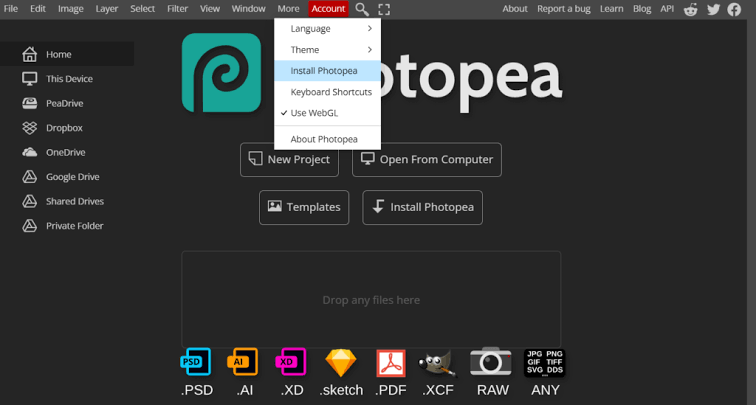
There is no large installer. Photopea runs in a browser on Windows, macOS, Linux, Chromebooks, tablets and phones. If your browser supports progressive web apps, the install option in the More menu adds an icon to your device and opens the editor in a cleaner window. That window can also give you back some keyboard shortcuts the browser would otherwise take.
The browser is still doing the work underneath. Memory, hardware acceleration and extensions all affect how Photopea behaves. Be wary of anything else calling itself a Photopea download. Random APK files, cracked Premium copies and third-party installers carry real security risks and offer nothing in return. The official editor and its own install button are the only routes worth using.
The AI Is a Rough Draft, Not a Finish
Photopea's AI tools cover background removal, Magic Replace and generative fill. These are the jobs that used to take ten minutes of careful selecting. For product shots, social posts, portrait cleanup or filling empty space after you enlarge a canvas, they save real time.
They also miss. Flyaway hair, glass, hands, text and unusual lighting still confuse them, and generated patches can look soft or out of step with the rest of the image. Treat the output as a first pass. After removing a background, refine the edge with a mask. After swapping an object, check the edges, shadows and perspective before anything goes public.
Allowances are the other catch. Free and Premium accounts get different amounts of AI use, and heavy users can run out of monthly credits. Some Premium users can connect a key from an external AI service once the included allowance runs out, but that means another account and another bill.
Free Means Free, With Ads Attached
The free version is not a disguised trial. You can open and save files, work in PSD, use layers, export and finish professional-looking projects without paying. Exports do not normally carry a watermark. The cost is screen space. Ads sit beside the workspace, and they become tiresome over a long session.
Premium removes the ads and raises the AI allowance. It is sold for a fixed period, so you are not locked into an automatic long-term plan. There are options for single users, teams and distributors, plus a self-hosted edition for organisations. Prices can change, so check the Account window before you buy instead of trusting a figure quoted elsewhere.
You do not need to log in to edit. An account matters if you want Premium or want your settings, such as theme, language, colours and tool preferences, to follow you between devices. Sign-in goes through supported third-party account services. On a shared computer, log out when you finish and disconnect any cloud storage you linked.
Living With It Day to Day
Anyone who has used Photoshop will feel at home within minutes. Tools sit on the left, panels on the right, and menus for file, image, layer, select, filter and view run across the top. That familiarity is Photopea's biggest strength for experienced users and its biggest hurdle for newcomers, who see almost every option at once.
Performance follows your hardware. Because the work happens locally, a strong processor, plenty of RAM, a capable browser and hardware acceleration all make a visible difference. Large PSDs full of smart objects can slow down badly or crash the tab, so on long jobs you should save versions as you go. Phones can manage quick fixes, but detailed layer work on a small screen is a chore. A tablet or laptop is far more comfortable.
Photopea is the kind of site people bookmark and keep for years. If you have your own list of sites you could not do without, vote for the world's most useful websites on Icon Polls.
The Good and the Grating
What it gets right
- A strong free editor that needs no account
- Excellent support for opening and saving PSD files
- Runs on Windows, Mac, Linux, Chromebooks, tablets and phones
- Layers, masks, smart objects, vectors, filters and typography
- Local file processing during normal editing
- Can be installed as a progressive web app
- AI tools that speed up background removal and object replacement
- Broad format support for designers and photographers
What still grates
- Ads take up workspace in the free version
- The interface can overwhelm complete beginners
- Editing on a small phone screen is hard work
- Large files strain browser memory and device performance
- AI results still need manual checking and cleanup
- Included AI use is capped by account level
- No native desktop version that runs without a browser
- Unsaved work disappears if the tab closes or crashes
So, Should You Use It?
For quick and medium-sized projects, Photopea is one of the easiest editors to recommend. PSD compatibility, local processing, wide format support and a genuinely useful free tier are a rare combination. It falls short of four stars because the experience is uneven. Ads shrink the workspace, beginners face a learning curve, large files depend on browser stability, and mobile editing is still awkward. The AI helps, but it does not replace careful retouching.
The sensible approach is to start free and complete one real project using the kinds of files you normally handle. Save often, and inspect your exports before you publish them. Upgrade when ads, AI limits or daily use start to get in your way, and not before.
Three Things People Ask
Does Photopea work offline?
Partly. Once the editor has loaded, many editing functions keep working without a connection. AI tools, cloud storage, ads and other connected features may not.
Can it replace Photoshop?
For everyday PSD edits, social graphics, mock-ups, resizing and layered design, it often can. Advanced professional workflows may still need dedicated desktop software.
Is Premium worth paying for?
If you use Photopea daily and the ads or AI limits get in your way, probably. Occasional users will likely find the free version enough.