Most voice assistants still behave like a polite radio operator. You speak, you stop, it thinks, it answers. Cut in halfway through and it either ignores you or loses the thread. NVIDIA's PersonaPlex, released in January 2026, is built to break that habit. It listens while it talks.
That sounds like a small thing until you notice how much of real conversation happens in the overlaps: the quick acknowledgement, the interruption, the correction before someone finishes a sentence. PersonaPlex is designed for exactly that territory. It is also, firmly, a tool for developers. If you came here looking for an app to put on your phone, the short answer is that there isn't one. The longer answer is more interesting.
Fact File
| Product | NVIDIA PersonaPlex (personaplex-7b-v1) |
|---|---|
| What it is | An open speech-to-speech conversational AI model for real-time voice interaction |
| Released | January 2026 |
| Headline feature | Full-duplex conversation: it can listen while speaking, so people can interrupt and turns move quickly |
| Inputs and outputs | 24 kHz audio plus text prompts in; speech and text out |
| Runtime | PyTorch and Moshi |
| Supported setup | Linux with NVIDIA GPU acceleration; A100 and H100 listed as supported |
| Consumer app | None. The included Web UI is self-hosted |
| Hosted API | No simple public hosted API documented at review time |
| Licence | Code: MIT. Weights: NVIDIA Open Model License, gated on Hugging Face |
| Icon Polls rating | 3.9/5 |
Talking and Listening at the Same Time
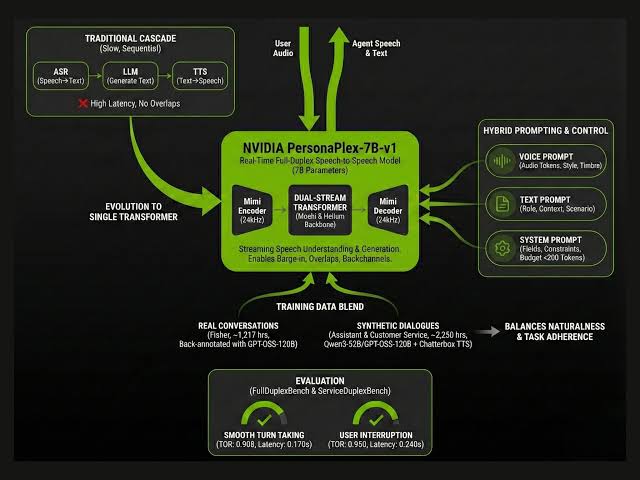
PersonaPlex is a 7 billion parameter model built on the Moshi architecture. The traditional voice pipeline works in relay: wait for the speaker to finish, transcribe, write a reply, then read it aloud. Each handoff adds delay, and the whole chain goes deaf while it speaks.
PersonaPlex handles incoming and outgoing audio streams at once. The payoff is timing. It can drop in short acknowledgements, cope with barge-ins and reply faster than a stitched-together system usually manages. For anyone who has shouted "stop" at a smart speaker that kept going, the appeal is obvious.
Two Dials: Who It Is and How It Sounds
The second reason PersonaPlex stands out is control. A text prompt sets the role, background and scenario, so you can tell it that it's a patient support agent or a gruff shopkeeper in a game. A separate audio voice prompt shapes vocal characteristics and speaking style.
Put those together and you get something closer to a character than a chatbot with a voice bolted on. That matters for game studios and anyone building an agent with a recognisable personality, rather than a generic narrator reading out text.
No App, and That APK Isn't Official
Plenty of people search for a PersonaPlex app. NVIDIA doesn't offer one on Google Play or the Apple App Store. What it releases is source code, model weights through Hugging Face and a browser interface you host yourself. Once the server is running, you open the Web UI in a browser, normally on port 8998.
So be sceptical of any download calling itself a PersonaPlex APK. The official project is a developer package, not a phone install, and a file borrowing the name is not the same thing.
Getting It Running
On paper the official setup is short. In practice it assumes a machine that's already prepared for this kind of work. The route on Ubuntu or Debian looks like this:
- Clone the official NVIDIA PersonaPlex repository from GitHub.
- Install the Opus development library.
- Install the Moshi package included with the project.
- Accept the gated model licence on Hugging Face and set your HF_TOKEN environment variable.
- Launch the Moshi server with a temporary SSL directory, then open the Web UI to pick a voice prompt, add a role prompt and start talking.
There's also an offline mode that takes an input WAV file and returns an output WAV file plus text. That's the smart place to start. You can judge tone, interruption handling and how well it sticks to a role before you wire up a microphone or put anything in front of customers.
The Hardware Question
This is where enthusiasm meets budget. The model card names Linux as the preferred operating system and lists NVIDIA Ampere A100 and Hopper H100 hardware as supported. NVIDIA's own test machine was an A100 with 80 GB of memory, which tells you roughly what dependable live use expects.
A CPU-offload option exists for GPUs short on memory, and offline evaluation can run on CPU-only PyTorch. Useful for tinkering. Not a promise of smooth real-time conversation. Public issue reports include requests for lower-VRAM support and complaints of choppy audio on some systems, so test on your own hardware before committing to a live deployment.
No API Key, But You Can Build Your Own Endpoint
If you're hoping to paste an API key into a website builder, PersonaPlex won't help yet. At review time there was no clearly documented managed endpoint, no public price list and no standard REST quick-start for non-technical users.
Developers can wrap their own deployment instead. A sensible design is a small backend that manages sessions, passes browser audio to the running PersonaPlex service and handles authentication, logging, rate limits and safety checks. Anyone collecting voice from the public should add clear consent notices, too.
What the Developer Chatter Tells You
Look at community discussion around PersonaPlex and the themes are consistent: installation, operating system compatibility (Mac users ask a lot), GPU memory, voice choices and audio bugs. Nobody is debating subscription tiers because there aren't any.
That's the profile of a promising open model at an early stage, not a finished platform. When it works, the lack of awkward pauses and the role prompting make a prototype feel deliberate in a way a plain speech recognition plus text-to-speech chain rarely does. Getting there takes effort.
Strengths and Weak Spots
Where it shines
- Genuine full-duplex design that handles interruptions and overlapping speech
- Text role prompts and audio voice conditioning give real creative control
- MIT-licensed code and a clear local Web UI route
- Commercial use indicated on the model card, subject to the licence terms
- Offline evaluation lets you test before building anything live
Where it falls short
- No consumer app and no easy hosted API
- Setup demands Linux experience and Hugging Face access
- High hardware requirements for smooth real-time use
- English speech is the stated use case, so other languages need separate testing
- Performance and compatibility vary between systems
Who Should Bother
We rate PersonaPlex 3.9/5. The technology is impressive and the development path is real, but it isn't a smooth product for everyday users. It makes sense for developers, AI labs, game studios and product teams with capable NVIDIA hardware and a reason to care about natural spoken timing: voice-agent research, customer service prototypes, interactive characters and demos where interruptions are part of the point.
If you need a consumer app, a cheap no-code tool or something that runs well on an ordinary laptop, a managed speech service will be easier, even without PersonaPlex's full-duplex trick. And if NVIDIA's run of releases has you thinking about the bigger picture, head over and vote for the best computer companies to say where you think it belongs.
Quick Answers
Is PersonaPlex free?
The code is MIT-licensed. The model weights fall under NVIDIA's Open Model License, which you must read and accept on Hugging Face before downloading or deploying.
Will it run on a Mac or Windows PC?
Linux is the officially preferred operating system. Community experiments on other platforms may exist, but they aren't official support.
Is it ready for customer service?
It's a strong base for prototypes thanks to role prompts and interruption handling. A production service still needs business data, guardrails, privacy controls, monitoring and testing against your own use case.