
Running one AI coding agent is a novelty. Running four at once is a management job. Plenty of developers are now juggling tmux panes, stray branches and a steady drip of permission prompts by hand, and Axel exists to clean that up. It's a free Mac app and Rust CLI from Txtx, Inc., and the idea behind it is sharp. The packaging around that idea is still early, and that's what decides whether you should build a workflow on it.
Axel at a glance
| Product | Axel |
|---|---|
| Developer | Txtx, Inc. |
| What it does | Orchestrates and queues tasks for AI coding agents |
| Status | Beta, under active development |
| Platform | Native macOS 14 or later (iOS and visionOS builds also listed) |
| Command line tool | axel, written in Rust, installed as axel-cli |
| Agents supported | Claude Code, Codex, OpenCode, Antigravity |
| Terminal layer | tmux, with Ghostty or iTerm2 |
| Isolation | One git worktree and branch per agent |
| Project config | AXEL.md: YAML frontmatter plus markdown |
| Price | Free, no published paid plan |
| Source | GitHub: scarce/axel, no declared licence |
| Website and docs | axel.build and docs.axel.build |
| Icon Polls rating | 3.8 out of 5 |
A traffic controller, not a pilot
Axel ships no model of its own, and that's deliberate. It sits above the agent you already pay for and handles scheduling, terminal panes and approvals. Three design choices stand out.
Portable skills. Write a skill or system prompt once, keep it in ~/.config/axel/skills, and Axel symlinks it into whatever location each agent expects when it launches. Anyone who has kept two agents' config files in sync by hand will see the appeal immediately. It's the best idea in the product.
A gate by default. Every file edit and shell command becomes a permission request. You can write auto approve rules for read only operations or small edits, but nothing runs unchecked out of the box. For software designed to run several agents at once, that's the correct default.
The bill, as you go. Axel tracks tokens and dollar cost per task, with running totals per session. Few tools in this category bother.
The catch is obvious once said aloud: Axel coordinates agents, it doesn't make them smarter. If your agent writes a bad refactor, Axel will run it neatly in a clean worktree and tell you exactly what it cost.
Where the 3.8 comes from
We scored six areas and averaged them.
| Area | Score | Why |
|---|---|---|
| Concept and workflow | 4.5 | Focused and opinionated, solves one real problem |
| Docs and onboarding | 4.0 | Short, clear, upfront about prerequisites |
| Agent flexibility | 4.5 | Four agents, no single vendor lock |
| Platform reach | 2.5 | No Windows or Linux app |
| Maturity | 3.0 | Beta, short commit history, no tagged releases |
| Cost | 4.5 | Free, reuses subscriptions you already have |
What the repository says that the landing page doesn't
When we reviewed scarce/axel in August 2026 it had around 206 stars, 15 forks, one open issue and roughly 64 commits, split into app, cli, web and docs folders. The Mac app is SwiftUI; the CLI is Rust.
The bigger point is what's missing. There's no LICENSE file and no licence listed. Public source is not the same as open source, so if your company has any procurement process, ask before standardising on it. There are also no tagged releases: the app arrives as a DMG from an S3 bucket and the CLI via an install script or Cargo, which means no changelog and no easy version pinning. Repo naming is tangled too, with links pointing at txtx/axel-app, txtx/axel and scarce/axel. That's early stage housekeeping, not a red flag, but together with a short commit history it tells you very few people are carrying this project.
From zero to first worktree
If you already live in a terminal, setup is quick.
- Install tmux (3.0 or later is recommended; brew install tmux on a Mac) and at least one agent such as Claude Code or Codex.
- Install the CLI. The fast route pipes the script at install.axel.rs to bash. If you'd rather not pipe scripts into your shell, and that's a sensible instinct, cargo install axel-cli builds from source. Check it with axel --version.
- Download the Mac app DMG from the product site. It can install the CLI to ~/.local/bin itself if needed.
- Write an AXEL.md for your project, defining panes, skills and grid positions. Spend real time here: it's what makes your layout reproducible.
After that the loop is simple. Create a task, assign an agent, and Axel spawns a tmux session in a fresh git worktree (axel -w feat/auth does it straight from the terminal). Output and permission prompts land in the app; you review, merge and mark it done. Building the app yourself needs Xcode 15 or later. Most people should just take the DMG.
Free, with an asterisk
There's no pricing page, no tiers, no trial that quietly converts. Axel costs nothing. Your real spend is your agent subscriptions, and parallel agents push that number up, not down. At least Axel shows you the running total.
The fair caveat: a free beta with no licence and no business model hasn't said what it wants to become. It could stay free, add a paid team tier, or stall. Plan accordingly.
Living with it
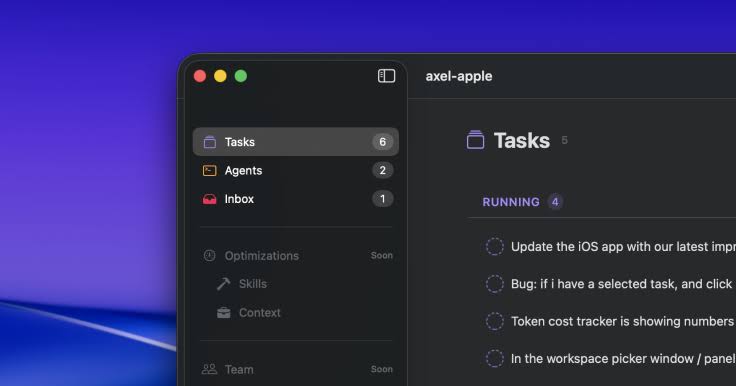
The stated goal is a calm task list for agents in chaos, with an interface modelled on Things. That means a five column workspace (tasks, inbox, terminals, skills, team) and keyboard shortcuts for almost everything.
- The inbox is the star. Requests arrive with the file path, a diff preview and command arguments, plus macOS notifications when an agent is blocked.
- Real terminals. Genuine tmux panes and worktrees mean sessions persist and you can work around the app without breaking anything.
- Live reprioritising. Drag tasks into a new order while they run.
- High entry bar. It assumes fluency with tmux, worktrees and an agent CLI.
- Unproven team sync. Collaboration runs on Automerge CRDT with Supabase. We couldn't verify how well it holds up.
If Axel isn't your fit
- Conductor (Melty Labs): the closest Mac rival, free and further along.
- Nimbalyst (formerly Crystal): open source, cross platform, kanban board with inline diffs.
- Claude Squad: a terminal interface for people who find Axel too graphical.
- Vibe Kanban: open source, board style, runs via npx, more team oriented.
- Composio Agent Orchestrator: for a self hosted fleet.
- Pane: native on Windows.
If you aren't on a Mac, the choice is already made for you. Your operating system shapes which tools you can use at all, so tell us which one earns its place when you vote for the best computer operating system.
Who should install it
Try Axel if you're a Mac developer already wrangling three or more agents in tmux; it will probably feel like relief. Wait if you need Windows or Linux, need licence clarity for work, or want software you can trust without watching it. If you run one agent inside an IDE, it solves a problem you don't have yet.
Answers before you install
Is Axel open source?
The code is readable on GitHub, but no licence is declared, so confirm terms before commercial use.
Does Axel work on Windows or Linux?
The app doesn't. The Rust CLI reaches further, but the full experience needs macOS 14 or later.
Is it the same as the axel download manager?
No. The long running Linux download accelerator is unrelated, as is the chip company Axelera AI.