
|
Profile Item |
ICON POLLS Findings |
|
Brand name |
Revo AI Email Assistant |
|
Main category |
AI email assistant, proactive AI work assistant, inbox and meeting productivity tool |
|
Best known for |
Drafting replies in a user’s voice, inbox triage, follow-ups, meeting notes, and work automation |
|
Supported email accounts |
Gmail and Outlook, based on Revo’s public onboarding pages |
|
Free access |
Free trial available. Revo publicly lists a 14-day trial with no credit card needed |
|
Paid plans seen in 2026 |
Starter, Professional, and Enterprise pricing tiers |
|
Starting price listed publicly |
$22.50 per seat per month on annual billing for Starter at the time of review |
|
Integrations |
Revo promotes Slack, Jira, Salesforce, CRM data, documents, meetings, and 50+ integrations |
|
Security claims |
SOC 2 Type II, ISO 27701, GDPR, encryption, no AI training on user email data |
|
Best fit |
Teams and professionals who need faster replies with business context, not just polished wording |
|
ICON POLLS rating |
3.7 out of 5 |
Revo AI Email Assistant Review in 2026
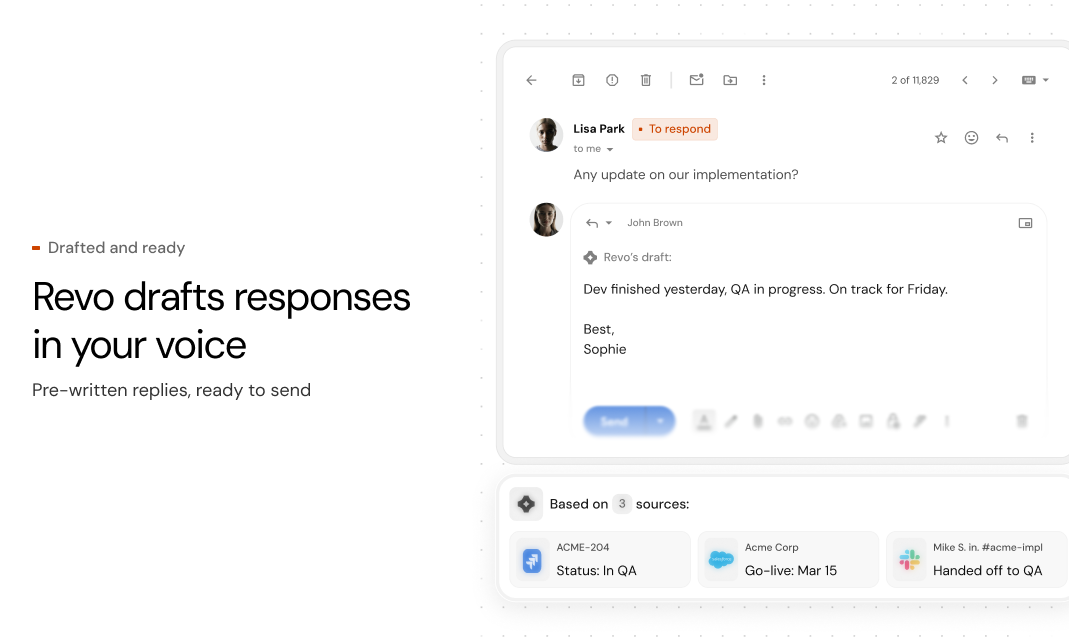
Revo’s biggest selling point in 2026 is context. Many AI email tools can rewrite a sentence, summarize a long email, or suggest a reply. Revo is trying to go further by pulling useful context from meetings, Slack conversations, Jira tickets, CRM records, documents, and connected work tools before it drafts an email. That matters because professional email is rarely just about tone. It is about knowing what was promised, who owns the next step, what the customer asked for, and what has already been agreed internally.
This is where Revo feels more mature than basic email writing extensions. The product is not only asking, “How should this reply sound?” It is asking, “What does the assistant need to know before this reply is safe to send?” For sales, customer success, legal, consulting, recruiting, finance, and operations teams, that kind of memory can be genuinely useful.
At the same time, Revo may feel too advanced for someone who only wants a simple free Gmail writing tool. The product is clearly aimed at professionals and teams that can justify a monthly subscription because email time is expensive for them. That is why our 3.7 rating is positive, but not perfect. Revo has strong potential, but its full value depends on whether users connect enough tools and trust the assistant with enough business context.
Revo AI Email Assistant Free
Revo is not best described as a fully free AI email assistant. The better description is that it offers a free trial. Public Revo pages list a 14-day free trial, with no credit card needed, and the option to cancel anytime. This is helpful because users can test the assistant before paying.
For searchers asking whether Revo is free, the answer is simple: Revo appears to be free to try, but not free as a long-term full product. After the trial, users should expect to choose a paid plan if they want to continue using the main features. ICON POLLS sees this as reasonable for a business tool, but individual users who only need occasional email help may prefer a cheaper or built-in assistant.
Revo AI Email Assistant Download
Revo’s public onboarding focuses on connecting Gmail or Outlook rather than downloading a traditional desktop file. Users searching for “Revo AI Email Assistant download” should understand that this is more of a cloud-connected assistant than a simple offline app. The common route is to start from Revo’s website, choose Gmail or Outlook, and connect the account through the login process.
That makes setup easier for many professionals because they do not have to install a complicated program first. The tradeoff is that users must be comfortable granting permissions to an AI assistant that needs access to email, calendar, meetings, and other work tools to perform well. Revo’s value comes from connected data, so privacy and permission review should be part of every user’s setup process.
Revo AI Email Assistant Login
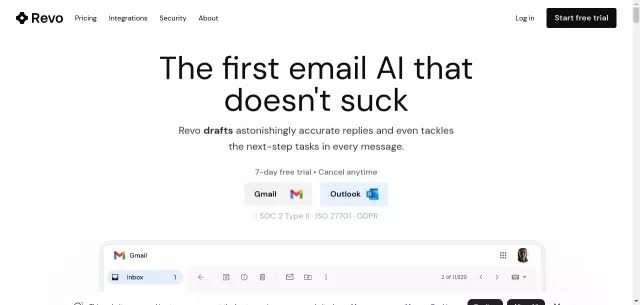
The Revo login experience appears built around Gmail and Outlook connection. A user can start with either email provider, authorize access, and then allow Revo to learn from relevant inbox and work context. This is a familiar flow for modern SaaS tools, especially those used by teams.
The main thing to watch is account scope. Before approving access, users should check which inbox, calendar, and work tools are being connected. Revo’s public pages say users can control permissions and disconnect tools, which is important. For business users, the best practice is to connect only the accounts needed for work and review organization policies before using AI with sensitive email.
Revo AI Email Assistant App
As an app, Revo feels more like a productivity layer over email and work tools than a standalone writing box. That is a good thing if your daily work already happens across Gmail, Outlook, Slack, meetings, Jira, Salesforce, and documents. Revo is designed to sit around those tools and make the inbox less manual.
The strongest app features are inbox triage, reply drafts, meeting follow-ups, email categorization, and proactive actions. In plain English, Revo tries to tell you what matters, draft the next message, and line up the action you probably need to take. It is not just a “make this email sound better” tool.
The weak side is that the product may feel heavy if you do not already have a busy workflow. A freelancer with ten emails a day may not need the full system. A founder, attorney, consultant, sales lead, or customer success manager with hundreds of threads may see the point much faster.
Revo AI Email Assistant Agent
The agent side of Revo is what makes the product more interesting in 2026. Revo describes itself as a proactive assistant that can capture tasks from emails, meetings, and chats, then line up work that can be completed with approval. This shifts it from a passive writing assistant into something closer to an AI work agent.
For example, after a meeting, Revo may summarize what happened, identify the next steps, and prepare a follow-up email. In a sales or customer success setting, that can save time and reduce missed commitments. In operations, it can help convert decisions into tasks. In legal or finance, the value depends heavily on accuracy, permission controls, and whether the organization is comfortable with the system.
ICON POLLS likes the agent direction, but we would still advise users not to let any AI assistant send sensitive messages without review. Revo’s public wording says drafts do not send without approval, which is the right approach. Human review still matters because email mistakes can damage relationships, contracts, deals, and customer trust.
User Experience
Revo’s user experience is strongest when the user has a clear business workflow. Connect email, connect meetings, connect important tools, then let the assistant build context. The benefit should show up as faster replies, cleaner follow-ups, fewer forgotten tasks, and less time spent searching for what someone said in a call or chat.
The onboarding message is simple enough, but the bigger question is trust. Users have to believe that the assistant understands context, handles permissions correctly, and does not expose sensitive information. Revo’s security claims are strong on paper, including SOC 2 Type II, ISO 27701, GDPR, encryption, and statements that user data is not used to train AI models. Those claims help, especially for teams.
The experience could still be clearer for ordinary users. Some searchers will want a download button, a free app, or a simple login page. Revo’s positioning is more enterprise and workflow-focused, so casual users may need more explanation before they understand why it costs more than a basic AI writing extension.
Pricing and Value
Revo publicly shows paid plans that start with a Starter tier at $22.50 per seat per month when billed annually, a Professional tier at $37.50 per seat per month when billed annually, and custom Enterprise pricing. Prices can change, so users should confirm directly on Revo’s website before buying.
At that price, Revo is not competing mainly with free grammar tools. It is competing with time loss. If Revo saves a busy professional one or two hours a week, the pricing can make sense. If it saves a founder, executive, lawyer, recruiter, or sales lead several hours a week, the value becomes easier to defend. If the user only sends a few emails daily, the value may feel harder to justify.
Pros and Cons
What We Like
Strong focus on business context, not just email rewriting.
Works with Gmail and Outlook, which covers the main professional inboxes.
Useful agent angle for meetings, follow-ups, tasks, and connected tools.
Public security language is stronger than many small AI email tools.
Good fit for sales, operations, legal, consulting, recruiting, customer success, and executive workflows.
What Could Be Better
Not a long-term free product, based on the public pricing structure.
May feel expensive for individuals who only need light email help.
Requires trust and careful permission review because it connects to sensitive work data.
The product message may be too advanced for casual users searching for a simple email app.
Users still need to review drafts before sending important messages.
ICON POLLS Final Verdict
Revo AI Email Assistant earns a 3.7 out of 5 in our 2026 review. It is a strong product idea with a practical use case: help professionals reply faster, follow up better, and use real business context instead of generic AI guesses. The biggest strength is that Revo thinks beyond the inbox. It connects email with meetings, chats, documents, and work tools, which is where serious productivity gains can happen.
The main limitation is that Revo is not for everyone. It is best for people whose inbox is tied to revenue, clients, cases, projects, hiring, operations, or leadership. For casual users, it may feel more powerful and more expensive than needed. For teams that live in email and lose hours to follow-ups, Revo is worth testing during the free trial.
Frequently Asked Questions
1. Is Revo AI Email Assistant free in 2026?
Revo offers a free trial, but it should not be treated as a fully free long-term product. Public Revo pages list a 14-day trial with no credit card needed. After the trial, users should expect to move to a paid plan if they want to continue.
2. How do I download Revo AI Email Assistant?
Revo is mainly accessed through its website by connecting Gmail or Outlook. Users searching for a download should know that Revo works more like a cloud-based AI assistant than a traditional offline desktop download.
3. How do I login to Revo AI Email Assistant?
The normal login route is to start from Revo’s website and connect a Gmail or Outlook account. Users should review permissions carefully before connecting work email, calendar, or other company tools.
4. Does Revo AI Email Assistant work with Gmail?
Yes. Revo publicly promotes Gmail connection as one of its main setup options. This makes it useful for users and teams that already manage daily work through Google Workspace.
5. Does Revo AI Email Assistant work with Outlook?
Yes. Revo also promotes Outlook connection. That makes the product relevant for Microsoft 365 users, business teams, and organizations that use Outlook as their main inbox.
6. What does Revo AI Email Assistant actually do?
Revo triages inboxes, drafts email replies, summarizes meetings, prepares follow-ups, identifies tasks, and uses connected work context to make replies more accurate. Its value is not only writing style, but business memory.
7. Can Revo send emails automatically?
Revo’s public messaging says it drafts replies and keeps users in control. For important work, users should review every draft before sending, especially when messages involve contracts, customers, legal matters, finance, or private data.
8. Is Revo AI Email Assistant safe to use?
Revo publicly claims SOC 2 Type II, ISO 27701, GDPR compliance, encryption, no human reading of emails, and no training on user email data. Those are positive signals, but companies should still review permissions and policies before adoption.
9. What is Revo AI Agent?
The agent side of Revo refers to its proactive ability to identify work from emails, meetings, and chats, then line up actions or follow-ups for approval. This makes it more than a simple email rewriter.
10. How much does Revo AI Email Assistant cost?
At the time of this review, Revo publicly listed Starter at $22.50 per seat per month on annual billing and Professional at $37.50 per seat per month on annual billing. Enterprise pricing is custom. Users should confirm current pricing directly before subscribing.
11. Who should use Revo AI Email Assistant?
Revo is best for professionals with a heavy inbox, frequent meetings, and many follow-ups. Founders, executives, lawyers, consultants, recruiters, sales teams, customer success teams, and operators are likely to benefit most.
12. Is Revo AI Email Assistant worth it in 2026?
Revo is worth testing if email takes too much of your workday and your replies require context from meetings, chats, documents, or CRM tools. It may not be worth it for light users who only need occasional writing help.